· The Rapid Architect Team · AI · 12 min read
Beginner's Guide to Quick-Win AI Tools for SMBs (No Tech Team Needed)
Stop drowning in AI tool recommendations. This practical guide helps SMB owners find quick-win AI tools they'll actually use—no tech team required. Learn the six proven use cases, three accessible tools to try this week, and a 7-day action plan to start saving hours immediately.

Podcast Discussion
Introduction
Stop drowning in tool recommendations. Here’s what actually works for busy business owners who don’t have time to become artificial intelligence experts.
If you’ve spent any time searching for “artificial intelligence tools for small business,” you know the problem: every article promises to reveal the “essential” tools that will “transform” your operations. By the time you’ve scrolled through lists of 15, 20, or even 30 recommendations, you’re more overwhelmed than when you started.
Here’s the truth that most artificial intelligence guides won’t tell you: approximately 68% of small businesses are now using artificial intelligence in some capacity [9], but the majority started with just one or two simple tools—not a complete digital overhaul. The secret isn’t finding the most powerful artificial intelligence; it’s finding the artificial intelligence you’ll actually use.
As one industry expert put it bluntly: “The best artificial intelligence tools for small business owners in 2026 are not the most advanced ones; they are the ones you will actually use” [7]. That’s the philosophy behind this guide. No jargon. No endless lists. Just practical tools you can set up this week without hiring a developer or calling your tech-savvy nephew.
If you’re a business owner who wears every hat from CEO to customer support [6], this guide is for you. Let’s cut through the noise and find your first quick win.
Why Most artificial intelligence Guides Fail Small Business Owners
Let’s address the elephant in the room: you’re being sold a conveniently packaged lie [8]. The typical artificial intelligence article presents a fantasy world where you’ll implement a dozen tools, automate everything, and suddenly have unlimited free time. Reality looks different.
Most small business owners who try to adopt artificial intelligence this way end up:
- Signing up for free trials they forget to cancel
- Spending more time learning tools than they save using them
- Feeling like they’re falling behind because they haven’t “transformed” their business yet
The problem isn’t you—it’s the approach. Running a small business without artificial intelligence tools means working harder than you need to [4], but running a business while constantly chasing new tools isn’t the answer either.
What works is starting small, picking one bounded task, and mastering it before moving on. That’s the approach we’ll take together.
The Real Benefit: Buying Back Your Hours
Before we talk about specific tools, let’s reframe what artificial intelligence actually offers you. Forget buzzwords like “digital transformation” or “competitive advantage.” For SMB owners, artificial intelligence delivers one core benefit: time recovery.
Think about your typical week. How many hours do you spend on tasks that feel repetitive? Drafting similar emails. Scheduling social media posts. Following up with leads who’ve gone quiet. Summarizing meeting notes. These tasks matter, but they don’t require your unique expertise or creativity.
artificial intelligence has shifted from luxury to necessity for SMBs [6] not because it’s trendy, but because it can handle these time-draining tasks while you focus on work that actually requires a human touch—building relationships, making strategic decisions, and growing your business.
Here’s a practical way to think about it: if you could save just 5 hours per week on email responses and content creation, that’s 260 hours per year. What would you do with an extra six-and-a-half work weeks?
The Six Proven Use Cases for SMB artificial intelligence Adoption
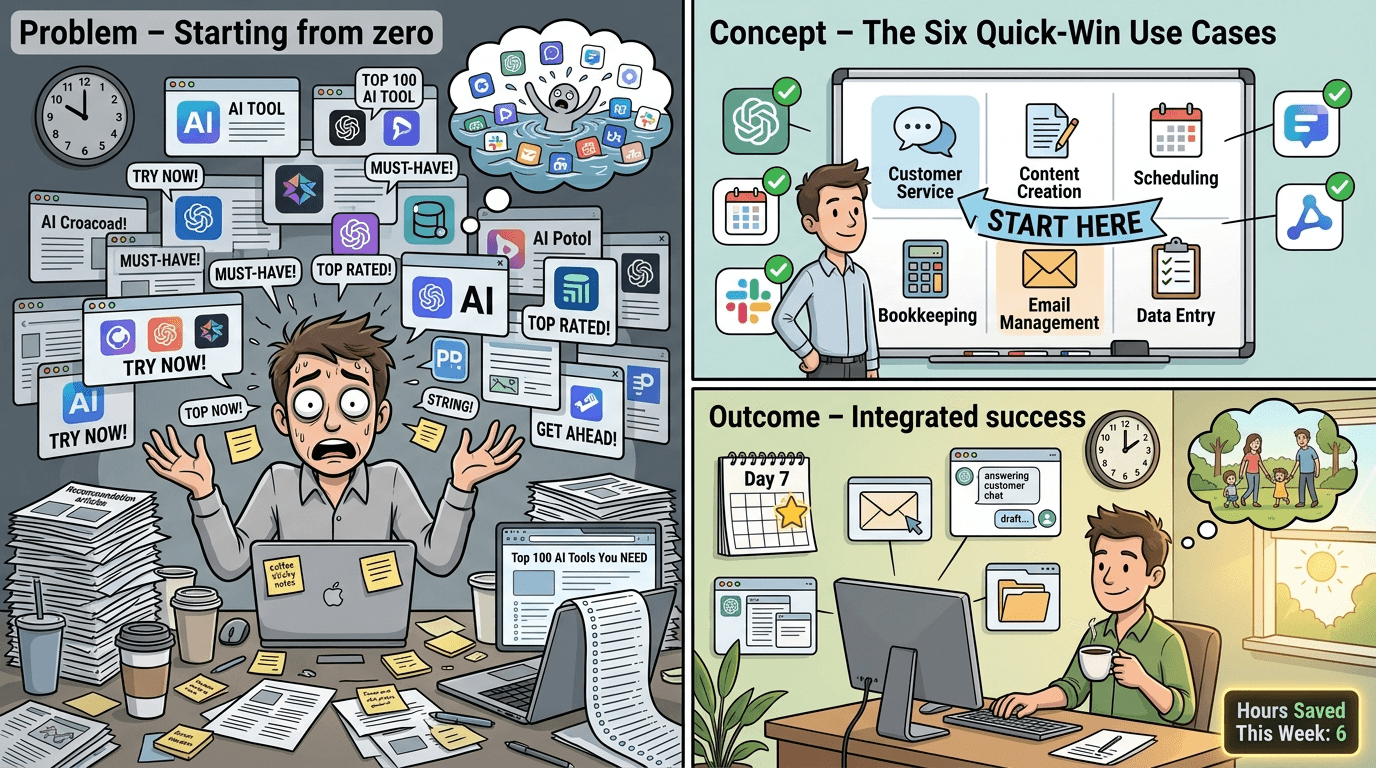
Research consistently identifies six areas where artificial intelligence delivers the fastest, most reliable wins for small businesses [2, 7]. These aren’t experimental applications—they’re proven use cases with accessible tools and immediate ROI.
1. Customer Service and Support
artificial intelligence chatbots and email assistants can handle common customer questions, freeing you to manage exceptions and complex issues. This is particularly valuable for businesses without dedicated support staff.
2. Email Automation and Communication
From drafting professional responses to sorting your inbox by priority, artificial intelligence can transform how you manage the email burden that consumes hours of most owners’ days.
3. Content Creation
Blog posts, social media updates, product descriptions, newsletters—artificial intelligence writing assistants can produce first drafts in minutes, leaving you to edit and add your personal voice.
4. Scheduling and Calendar Management
artificial intelligence scheduling tools eliminate the back-and-forth of booking meetings, automatically finding times that work for everyone involved.
5. Sales Follow-Up
Leads go cold when follow-up gets delayed. artificial intelligence can automate personalized check-ins, ensuring no prospect falls through the cracks.
6. Analytics and Reporting
Instead of manually pulling data from multiple platforms, artificial intelligence can consolidate information and highlight what actually matters for your decisions.
Pick one of these six areas—ideally the one causing you the most daily frustration—and that’s where you’ll start.
Three Quick-Win Tools You Can Set Up This Week
Rather than overwhelming you with options, here are three widely-recommended, accessible tools that serve as excellent starting points [8]. Each one addresses one of the proven use cases above and requires zero coding knowledge.
ChatGPT (Content and Communication)
What it does well: ChatGPT excels at drafting emails, creating content outlines, summarizing documents, and brainstorming ideas. You can use it to write customer responses, product descriptions, social media posts, or even job listings.
Where it falls short: It requires clear prompts to produce useful output, and you’ll need to review everything for accuracy and tone. It doesn’t know your specific business context unless you provide it.
Getting started: Sign up for the free version, then try this prompt: “Write a friendly follow-up email to a customer who purchased from us two weeks ago. Keep it brief and ask how their experience has been.” Edit the result to match your voice, and you’ve just saved 10 minutes.
Time savings potential: 3-5 hours per week on email and content tasks
Grammarly (Professional Communication)
What it does well: Grammarly catches errors and improves clarity across everything you write—emails, documents, social posts. Its artificial intelligence suggestions go beyond grammar to help with tone and conciseness.
Where it falls short: The free version has limitations, and it occasionally makes suggestions that don’t fit your intended style. It’s a tool for polishing, not creating from scratch.
Getting started: Install the browser extension and let it work in the background as you write. Pay attention to its suggestions for a week—you’ll start naturally avoiding your common mistakes.
Time savings potential: 1-2 hours per week on editing and revision
Buffer (Social Media Management)
What it does well: Buffer allows you to schedule posts across multiple platforms, and its artificial intelligence assistant helps generate post ideas and captions based on your content. You can batch your social media work into one session per week.
Where it falls short: You still need to provide content ideas and images. The AI-generated captions need human review to ensure they match your brand voice.
Getting started: Connect your social accounts, then schedule a week’s worth of posts in one sitting. Use the artificial intelligence caption generator when you’re stuck, but always add your own spin before publishing.
Time savings potential: 2-4 hours per week on social media management
The “artificial intelligence Employee” Mindset Shift
Here’s a concept that makes artificial intelligence adoption click for many business owners: think of these tools as artificial intelligence employees [9]. They’re digital team members who handle specific, repetitive tasks—answering routine emails, posting content, following up with leads—without needing ongoing management.
The key phrase to remember: you do not need to code [9]. Modern artificial intelligence tools are designed for business owners, not developers. If you can fill out a form and write a clear instruction, you have all the technical skills required.
When you hire a human employee, you wouldn’t expect them to do everything on day one. You’d give them one responsibility, train them on your preferences, and gradually expand their role. Treat artificial intelligence the same way:
- Week 1: One tool, one task
- Weeks 2-4: Refine how you use it, establish your workflow
- Month 2: Consider adding a second tool or expanding the first one’s role
This patient approach builds genuine competence rather than surface-level dabbling.
Your First 7-Day Action Plan
Theory is worthless without action. Here’s exactly what to do this week to get your first artificial intelligence quick win, based on the 90-Day Playbook approach [10]:
Day 1: Choose Your Pain Point
Look at your calendar and task list from last week. What repetitive task consumed the most time or caused the most frustration? That’s your target.
Day 2: Select One Tool
Based on your pain point, pick one tool from the recommendations above—or research alternatives in that specific category. Don’t compare more than three options. Analysis paralysis kills momentum.
Day 3: Set It Up
Spend 30 minutes (set a timer) creating your account and completing basic setup. Most tools have onboarding tutorials—use them.
Day 4: First Real Use
Use the tool for an actual business task. Not a practice run—something you need to do anyway. Draft a real email, schedule real posts, or generate a real piece of content.
Day 5: Evaluate and Adjust
Did the tool save time? Was the output usable? What would you do differently? Make one adjustment based on what you learned.
Day 6: Repeat and Refine
Use the tool again for the same type of task. Notice if it’s getting easier. Refine your approach.
Day 7: Decision Point
Is this tool earning its place in your workflow? If yes, keep using it for two more weeks before considering any additions. If not, try one alternative—then move on regardless.
Writing Your One-Page artificial intelligence Policy
Before you get too deep into artificial intelligence adoption, take 20 minutes to write a simple artificial intelligence policy for your business [10]. This doesn’t need to be a legal document—it’s a personal guideline that keeps you focused and prevents scope creep.
Your one-page policy should answer:
What tasks will I use artificial intelligence for? (Be specific: “Drafting initial email responses” not “communication”)
What tasks will I NOT use artificial intelligence for? (Perhaps: “Final customer communications without human review”)
How will I handle AI-generated content? (Will you disclose artificial intelligence assistance? Always edit before publishing?)
What’s my review process? (Every artificial intelligence output gets human eyes before it goes external)
What’s my monthly tool budget? (Even if it’s zero for now—free tiers only)
This document protects you from shiny object syndrome and ensures artificial intelligence serves your business goals rather than becoming another distraction.
Honest Expectations: What artificial intelligence Won’t Do
Let’s be clear about limitations, because understanding these will help you succeed:
artificial intelligence won’t replace your judgment. It can draft, suggest, and automate, but strategic decisions still require your expertise and knowledge of your specific situation.
artificial intelligence won’t know your business automatically. You’ll need to provide context, examples, and feedback. The more you teach it about your preferences, the better it performs.
artificial intelligence won’t be perfect. Expect to edit, refine, and occasionally start over. The goal is “faster and good enough,” not “flawless on the first try.”
artificial intelligence won’t eliminate all repetitive work. Some tasks still require human touch. artificial intelligence shifts what you spend time on—it doesn’t eliminate work entirely.
artificial intelligence tools change frequently. What works today might look different in six months. Build the skill of evaluating and adapting, not just using specific features.
When to Add Your Second Tool
Resist the urge to stack tools immediately. You’re ready to expand when:
- You’ve used your first tool consistently for at least 3-4 weeks
- You can estimate the time it saves you weekly
- You’ve developed a reliable workflow that doesn’t require conscious thought
- You’ve identified a second clear pain point that isn’t addressed by your current tool
When you do add a second tool, follow the same 7-day process. Slow and steady wins this race.
The 90-Day Horizon
If you follow this guide, here’s what realistic artificial intelligence adoption looks like over three months [10]:
Month 1: One tool, mastered. You’re saving 3-5 hours per week with confidence.
Month 2: Second tool added if appropriate. You’re seeing cumulative time savings and your workflows feel more efficient.
Month 3: Evaluate results. Are you actually doing more strategic work with your recovered time? Adjust your approach based on real outcomes.
After 90 days, you’ll be in the 68% of small businesses using artificial intelligence effectively [9]—not experimenting, actually benefiting. That’s when you can thoughtfully consider more advanced applications.
Conclusion: Your Monday Morning Starts Now
artificial intelligence for small business isn’t about keeping up with trends or impressing anyone with your tech-savviness. It’s about buying back hours from tasks that drain your energy without requiring your expertise.
The research is clear: the businesses succeeding with artificial intelligence aren’t the ones using the most tools—they’re the ones who picked one problem, found one solution, and stuck with it long enough to see results [7].
Your action step is simple: before you close this article, decide which of the six use cases causes you the most frustration. Then pick one tool to try. Not tomorrow. Not “when things slow down.” This week.
You don’t need a tech team. You don’t need to code. You don’t need to understand how artificial intelligence works under the hood. You just need to start with one bounded task, one accessible tool, and seven days of genuine effort.
The businesses that thrive in 2026 and beyond won’t be the ones who read the most about artificial intelligence—they’ll be the ones who actually started using it. Your Monday morning begins now.
Sources
- BizBotLogic — “AI for Small Business in 2026: A Beginner’s Guide (No Jargon)” - https://bizbotlogic.com/ai-for-small-business-2026-beginners-guide/
- Beginners in AI — “AI for Small Business: A No-Nonsense Guide” - https://beginnersinai.org/ai-for-small-business/
- TheBizAI — “AI Tools for Beginners: Small Business Kit” - https://thebizai.co/ai-tools-for-beginners-small-business
- MindStudio — “10 Best AI Tools for Small Business Owners in 2026: No-Code Setup Guide” - https://www.mindstudio.ai/blog/best-ai-tools-small-business-owners-2026
- Salesforce — “18 Best AI Tools for Small Business Growth in 2026” - https://www.salesforce.com/artificial-intelligence/ai-for-small-business/best-ai-tools/
- Gladly — “7 Best AI Tools for Small Businesses in 2026” - https://www.gladly.ai/blog/best-ai-tools-for-small-businesses/
- Surgingtec — “What AI Tools Should Small Businesses Actually Use in 2026?” - https://surgingtec.com/ai-tools-for-small-business-2026/
- Too Many Hats — “AI Use Cases for Small Business: Six Ways to Start in 2026” - https://toomanyhats.net/guides/ai-for-small-business/ai-use-cases-small-business/
- Product Camps — “How to Build AI Employees for Your Small Business (No-Code Guide, 2026)” - https://productcamps.com/how-to-build-ai-employees-for-your-small-business-no-code-guide-2026/
- The Digital Guide — “AI Adoption for Small Businesses: A 90-Day Playbook” - https://thedigitalguide.org/ai